Tag: html5

  • Perlin noise based Minecraft rendering experiment

    Perlin noise based Minecraft rendering experiment

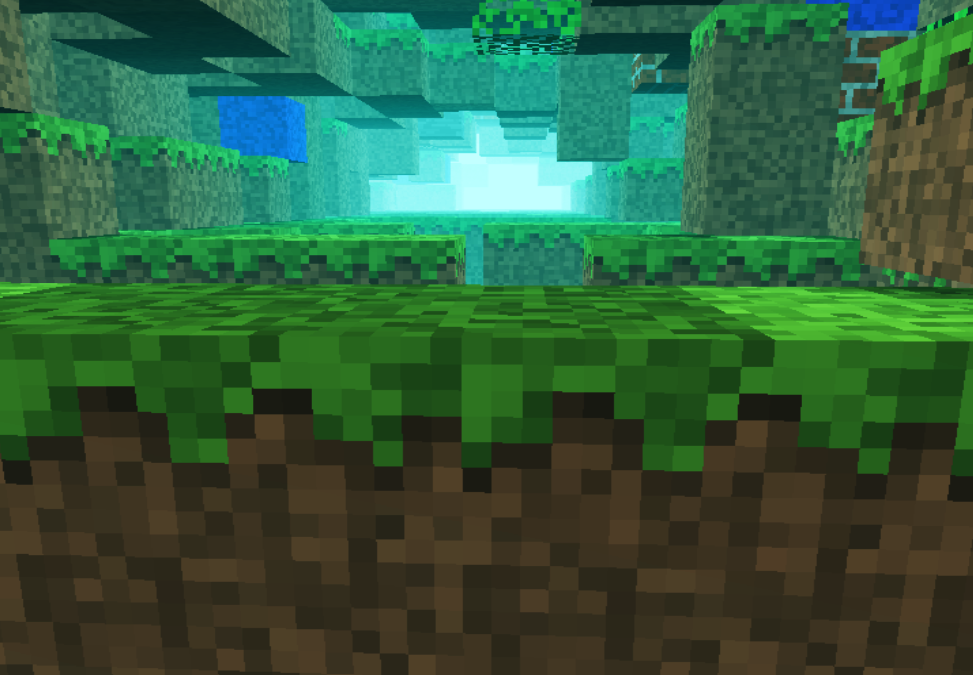
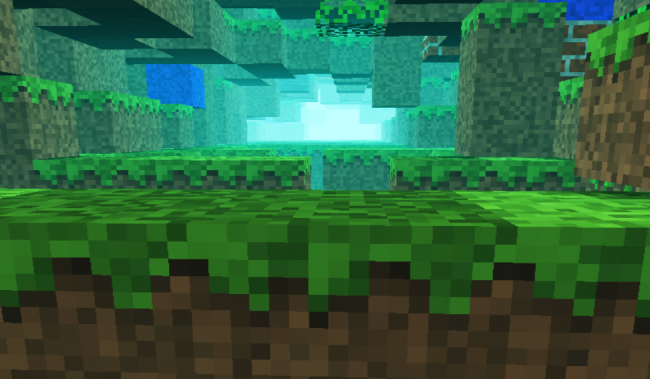
    Recently i was involved in a few different commercial projects, was toying with Golang, the shiny new language from Google and made some small snippets to test the language capability (i put them in my gist repository). In conclusion i somehow completely missed the creative coding. I had a few ideas and conceptions which i wanted to realize at an earlier or later stage. One of them was to adapt Notch minecraft renderer to be used in combination with perlin or simplex noise for generating random rendering maps.
    minecraft

    For that reason i ported to Javascript the original perlin noise algorithm written in Java. You can find the code here: https://gist.github.com/esimov/586a439f53f62f67083e. I won’t go into much details of how the perlin noise algorithm is working, if you are interested you can find a well explained paper here: http://webstaff.itn.liu.se/~stegu/simplexnoise/simplexnoise.pdf.

    As a starting point I put together a small experiment creating randomly generated perlin noise maps, and testing the granularity and dispersion of randomly selected seeding points to see how much they can be customized to create different noise patterns. I’m honest, actually these maps are not 100% randomly distributed, although they can be randomly seeded too, but for our scope I used a pretty neat algorithm for uniform granularity:

    
    // Seeded random number generator
    function seed(x) {
        x = (x<<13) ^ x;
        return ( 1.0 - ( (x * (x * x * 15731 + 789221) + 1376312589) & 0x7fffffff) / 1073741824.0);
    }
    

    And here is the working example:

    See the Pen Perlin metaball by Endre Simo (@esimov) on CodePen.

    The question that may arise: why should we need the perlin noise “thing” to generate different minecraft styled procedural terrain map? By generating randomly distributed noise we can further adjust the color mapping, then extract some of the areas above or below to certain values, which at a later state we can combine or even integrate into the core map generation logic. If you look at the alchemy behind the code responsible for programatically generating the terrain blocks, you will soon realize that we have all the ingredients (by manipulating some pixels here and there) to integrate the noise map into the block generation algorithm.

    In InitMap function we populate the map array with some initial values, then at a later stage after we generate the noise map, we extract the data as follows:

    
    for (var cell = 0; cell < pixels.length; cell += 4) {
        var ii = Math.floor(cell/4);
        var x = ii % canvasWidth;
        var y = Math.floor(ii / canvasWidth);
        var xx = 123 + x * .02;
        var yy = 324 + y * .02;
        
        var value = Math.floor((perlin.noise(xx,yy,1))*256);              
        pixels[cell] = pixels[cell + 1] = pixels[cell + 2] = value;
        pixels[cell + 3] = 255; // alpha.
    }
    

    then we go through the pixels data, setting up the condition on which data should be processed. In our actual case if the pixel color extracted is below to some certain value (this values are actually values extracted from the perlin noise map) then we set the map data to 0. This is why the perlin noise seed granularity is important. As smoother the transition between points is, as subtle would be the map generated.

    
    if ((pixelCol & 0xff * 0.48) < (64 - y) << 2) {
        map[i] = 0;
    }
    

    This is the basic logic for generating random minecraft terrain. We can even adjust the seed offset in perlin noise script to generate different patterns, however in my experiment seems that this doesn’t matter to much.

    The rendering engine is based on notch code, however i made some optimization adding some fake shadows and distance fog, creating a more ambiental environment.

    This is the code which creates the distance fog effect:

    
    var r = ((col >> 16) & 0xff) * br * ddist / (255 * 255);
    var g = ((col >> 8) & 0xff) * br * ddist / (255 * 255);
    var b = ((col) & 0xff) * br * ddist / (255 * 255);
    
    if(ddist <= 155) r += 155-ddist;
    if(ddist <= 255) g += 255-ddist;
    if(ddist <= 255) b += 255-ddist;  
    
    pixels[(x + y * w) * 4 + 0] = r;
    pixels[(x + y * w) * 4 + 1] = g;
    pixels[(x + y * w) * 4 + 2] = b;
    

    Playing with values i discovered that actually i can “move the camera around the scene” (actually here we have a fictive camera, meaning that not the camera is moving around scene, but the objects are projected around some fictive coordinates), so it was quite easy to get the mouse position and adjust the camera relative to the mouse position, this way including some user interaction into the scene.

    Version 2

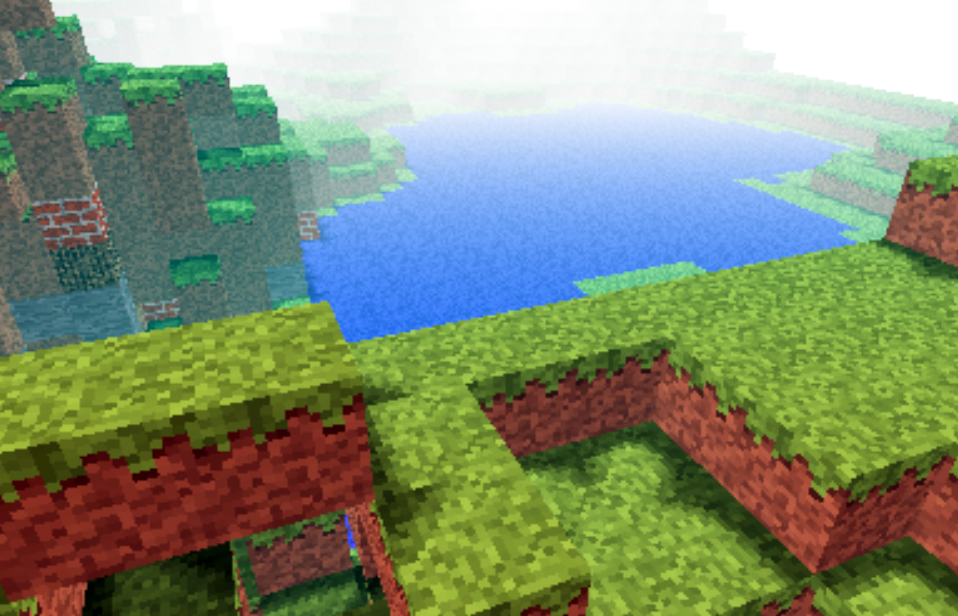
    Even tough the desired effect pretty much satisfied my expectations, something was really missing from the original version: it was not possible to generate randomly seeded terrain maps and also the generated map was pretty much the same. So I have extended the first version with random map generation, replaced the Perlin noise generator with the simplex noise, added fake shadow and fog to give the feeling of depth and on top of these i have also included a control panel to play with the values. This is how it came out:
    The source code can be found on my Github page:

    https://github.com/esimov/minecraft.js

  • A new look for my site

    A new look for my site

    It has been a very long time since my last post, ignoring almost any online social activity and not having too much free time for visual experimentation and self study, but finally find some time to finish the new look of my site. Actually is not only a new look, but a completely reworked and redesigned site from ground up. The previous version was based on WordPress. I liked the flexibility and easy to use feature of WordPress, which in essence could be to reduce to a two-step workflow: search for a theme, install it and you are good to go.

    footer-logo

    BTW this is the logo of my site designed by myself

    I was thinking from time to time, to give some personality to my site, meaning trying to keep myself distant from WP, maybe using only the backend part for content upload, post editing and any other content management activity.

    Searching for WP alternatives I found roots.io and Octopress the two most suitable alternatives for WordPress. Initially i opted for the first one only for the reason that i can preserve the current content without too much overhead. I found this a good alternative to WordPress for it’s minimal and accessible markup and for the fact it can rewrite the conventional wordpress URL’s, meaning it makes the path names cleaner, but on the other hand i thought it would be more challenging but at the same time more satisfying and rewarding to create my own custom Javascript library for building the site. For this scope i used PHP only for calling some web services, pulling out the content from WordPress database, wrapping as a JSON object, then transmitting over to the front end where with some ajax call i can build the whole page.

    I wanted to build the site using cutting edge modern web technologies for this reason many of the features are not working as expected on older browsers. The whole site has been build up around HTML5, Canvas and CSS3 spiced with a lot of Javascript. This is somehow a mini MVC framework, the model part being responsible for obtaining the JSON data from backend, the controller having as main role to communicate with the view and model (triggering the model and passing the results to the view the latter organizing the received data in a visual manner).

    Many of you may ask why i didn’t make it with more fashinable MV* frameworks like Backbone, Angular.js or Ember.js? My answer is: when i started this project i wasn’t very familiar with these technologies, i only heard about them, and once started i wanted to make it till the end. Maybe sometime i will think differently and will give it a try, but till then i’m pretty satisfied with the result. Of course there are some bugs which i have to address, like responsiveness, awkward page rendering when selecting a specific tag and associating the posts with these tags. Feel free to give any feedback be as good or bad.

    As you probably realized sometimes you are redirected to my other domain name (esimov.com). I’m not completely decided either to keep esimov.com or esimov.com as my main blogging platform, the first one having a more ‘business-ish’ feeling, on the other hand the last one suiting more for a personal blogging scope. I will decide later.

  • Worley noise cellular texturing

    Worley noise cellular texturing

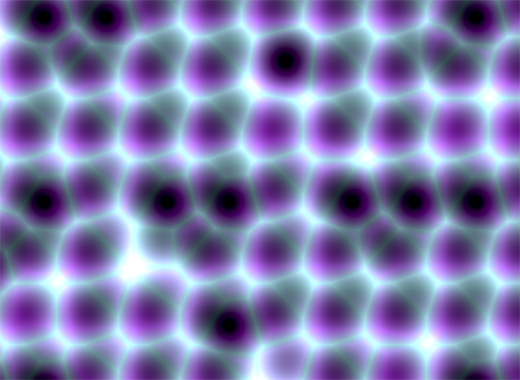
    There are some quite well known procedural content generation algorithms out there: Voronoi, Perlin noise, simplex noise, L-systems, reaction-diffusion systems like Turing pattern, which I’ve presented in my earlier blog post.The specifics of these algorithms are that either generates a large amount of content for a small investment of input data, or one that adds structure to random noise.

    Generally speaking they are categorized by what they generate (map vs sequence generation) and also by the mindset behind their use. This time we’ll discuss the Worley noise pattern, which can be included into the generative map creation category. This means we need a grid system for the representation and visualization of points scattered randomly in 3D or 2D space.

    In it’s visual appearance is almost like a Voronoi diagram, only it’s not as famous like it’s counterpart. Even Wikipedia discuss it very briefly. Worley noise in it’s essence is a noise generation pattern, which means by multiplication/addition of different octaves of the same noise pattern we can produce a variety and completely different outputs. This is the fun part of working with generative patterns.

    Now, after we gain a little theoretical introduction let’s get started with the basics, and try to dissect how can we reproduce those organic shapes and textures found in every living being in nature. (In parentheses being said, in many graphic simulations and parametric applications dealing with textural visualizations this shapes can be found). As a last side note before we go into the technical details, my intention was to implement the algorithm in Javascript mainly because i wished to be accessible by as many users as possible, and at the same time i was curious how far can i stress the limit of the modern web browsers. This is an experiment based 100% on CPU, so WebGL was out of scope, only because i was not playing with this technology until now, but i considering to implement on GPU in a shorter or longer future.

    Feature points

    The basic idea is to spread randomly varying number in space and calculate the distance to these point from every possible location of space. As a complement, Worley suggest to assign to each feature point an unique ID number. This number can be used to generate surface with colored areas or crocodile like textures, cityblock diagrams etc. depending on the algorithm, or coloring function implemented.

    The noise function simply computes a single value for every location in space. We can then use that value in literally thousands of interesting ways, such as perturbing an existing pattern spatially, mapping directly to a density or color or adding multiple scale of noise to make a fractal combination. While there are infinite number of possible functions which provide an infinite number of outputs, noise’s random behavior gives a much more interesting appearance  then simple gradients for example.

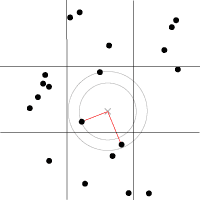
    By spreading  feature points randomly through the 3D space we build a scalar function based on the distribution of the points near the sample location. Because an image worth a thousand of words the picture below describes a space with feature points scattered across the plane.

    For a position on the plane (marked with x in the picture above) there is always a closest feature point, a second closest, a third and so on. The algorithm is searching for such feature points, return  their relative distance to the target point, their position and their unique ID number.

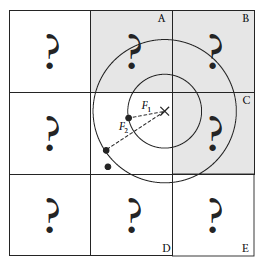
    Another key component of the algorithm is the demarcation line which is supposed to be integer in every plane. Each squares (cubes in 3D) are positioned so that their identification numbers can be expressed with some integer values. Let’s suppose we want to obtain the distance to the two feature point closest to the (3.6, 5.7) we start by looking at the integer squares (3, 5) and compare it’s feature points to each other.  It’s obvius that the two feature points in that square aren’t the two closest. One of them is, but the second closest belongs to the integer square (3, 6).

    It’s possible that some feature points are not inside the square where the target point is placed, in this case we extend our analysis to the adjacent squares. We could just test all 26 immediate neighboring cubes, but by checking the closest distance we’ve computed so far (our tentative n-th closest feature distance) we can throw out whole rows of cubes at once by deciding when no point in the neighbor cube could possibly contribute to our list. We don’t know yet what points are in the adjacent cubes marked by “?,” but if we examine a circle of radius F1, we can see that it’s possible that the cubes labeled A, B, and C might contribute a closer feature point, so we have to check them. As resulted from the image below, it’s mostly possible to check 6 facing neighbors of center cube (these are the closest and most likely to have a close feature point), 12 edge cube and 8 corner cubes in 3D. We could start testing more distant cubes, but it’s much more convenient to just use a high enough density to ensure that the central 27 are sufficient.

    The code implementation in Javascript

    For the code implementation i used html5 canvas. I’ve commented the source code, so won’t be too hard to follow for anyone. Because (as i mentioned in the beginning) my WebGL knowledge is quite minimal, for this reason i tried to optimize every single bit of code. For this reason my single option was to use web workers by separating the main core from the computationally heavy and intense pixel manipulation logic. There is a well described article on html5rocks.com about the basic principles of web workers, followed by some very neat examples regarding the implementation of them.

    The main advantage of using web workers is that we can eliminate the bottlenecks caused by computational heavy threads running in the background, separating the implementation interface from the computational logic. This way we can reduce the hangouts caused by intensive calculations which may block the UI or script to handle the user interaction.

    Creating a web worker is quite simple. We define the variables we want to pass to workers, and by calling an event listener using postMessage function we transfer the main tread instructions to the worker (which is running in a separate thread). Because web workers run in isolated threads, the code that they execute needs to be contained in a separate file. But before we do that, the first thing we have to do is create a new Worker object in our main page. The constructor takes the name of the worker script:

    In  a separate script we’ll define wich are the variables we want to listen for. This part is responsible for the heavy weight operations. After the pixel calculations has been done, we pass over the results through the postMessage method to the main thread. This part of code looks like the following:

    As a last option i’ve included the DAT.GUI lightweight graphical interface for a user interaction, where we can select different methods, colors etc. and lastly to offer the possibility for rendering with or without web workers.

    Hopefully you find interesting this experiment, and if you have some remarks, comments, then please use the comments field below, or share through twitter.

  • 404 page

    404 page

    During the setup of my site i decided to create a custom 404 page, inspired by this nice canvas experiment made by Hakim. I wanted the bubbles to be bursted by mouse click and to integrate the representative “404” text message, which i wanted to be reactive to the mouse and wave movement.

    So for that reason i’ve rewrite the code pretty much for my own purposes, plus i wanted to integrate some searching functions into my site. For this reason i was looking for a free php searching engine. I found sphider to be well acclaimed among users and developers, so i gave it a try. I managed to setup the search engine almost instantly, however the visual appearance have to be polished a little bit.

    A challenge for me was to integrate the text into the canvas considering I opted for a big bold character. I’ve tried the canvas native fillText function, but the text edges were very jaggy, so i decided to inject SVG code into the canvas, which looked like this:

    
    var data = "data:image/svg+xml," +
        "<svg xmlns='http://www.w3.org/2000/svg' width='400' height='400'>" +
        "<foreignObject width='100%' height='100%'>" +
            "<div xmlns='http://www.w3.org/1999/xhtml' style='font: bold 160px Myriad Pro, Arial, Helvetica, Arial, sans-serif'>" +
                "<span style='color:rgb(32,124,202); opacity: 0.8; -webkit-text-stroke-color: white; -webkit-text-stroke-width: 2px'>" + letters[pos] + "</span>" +
            "</div>" +
        "</foreignObject>" +
    "</svg>";
    

    As a last element I introduced a twitter feeder, which search for every word i define, and used Modernizr for a fallback for browsers which does not support canvas. Sorry IE.