Category: Language

  • Nice to meet you Go lang

    Nice to meet you Go lang

    Nice to meet You, GO!

    Recently i started to study Go language, the shiny new programming language developed by Google. The general opinion about the language among developers was quite positive so i thought to give it a try.

    As a web developer i’m working mainly with dynamic languages like PHP, Ruby, Javascript etc., so for me it was fresh new start to switch back to a language which has a standard AOT (Ahead of Time) compilator, contrary to JIT (Just in Time) compilers, which translate the human readable (high level) code to machine or byte code prior to execution, the compilation time being one of the strong feature of the Go language. Until now this was regarded as one of the great benefits of dynamic languages because the long compile/link step of C++ could be skipped, but with Go this is no longer an issue! Compilation times are negligible, so with Go we have the same productivity as in the development cycle of a scripting or dynamic language. On the other hand, the execution speed of the native code should be comparable to C/C++.

    Above the fast compilation time, another main characteristic of Go is that it combines the efficacy, speed and safety of a strongly and statically compiled language with the ease of programming of a dynamic language. Above these, Go is designed for fast parallelization, thread concurrency which are the basic desirables for network programming, Go definitely being designed for highly scalable and lightning fast web servers.This is certainly the great stronghold of Go, given the growing importance of multicore and multiprocessor computers, and the lack of support for that in existing programming languages.

    Because it is a statically typed language it’s a safe language, giving 100% percent trust for the programmer for incidental and not desired errors to not happen, assigning different types of values to the same variable (redeclaring) being impossible without an error notification. Go is strongly typed: implicit type conversions (also called castings or coercions) are not allowed; the principle is: keep things explicit!

    Text editors and IDE extensions for Go

    Having these basic ingredients at our disposal, combined with a powerful editor like IntelliJ IDEA extended with a very versatile Golang Idea Plugin specially developed to support all the syntactical sugar, auto completion, refactoring etc. desired for every IDE, programming in Go is pure fun. I can fully recommend this strong partnership.

    I’ve tried Sublime Text 2 editor with GoSublime plugin, but even if i’m a huge fan of Sublime i think the first option is a better choice. There is a dedicated page at the project site for the current existing editors supporting the language including Eclipse, but considering that till now i was very satisfied with InteliJ editors i sticked with IntelliJ IDEA.

    Installation

    The installation of Go is quite straightforward. You only need to follow the directions set on main site: http://golang.org/doc/install, paying special attention to setting up the environment variables. I won’t go into details how to do this (you can read this article if you need assistance), i will focus only on two special aspects of the installation process:

    1.) The first one is that if you are using Windows environment (i haven’t tested on other environments) and want to use Go with IntelliJ IDEA be careful to download the binary code, extract it and copy into the root folder of Go installation, otherwise it’s not possible to associate the project to the Go SDK. If everything went well, you should see something like this:
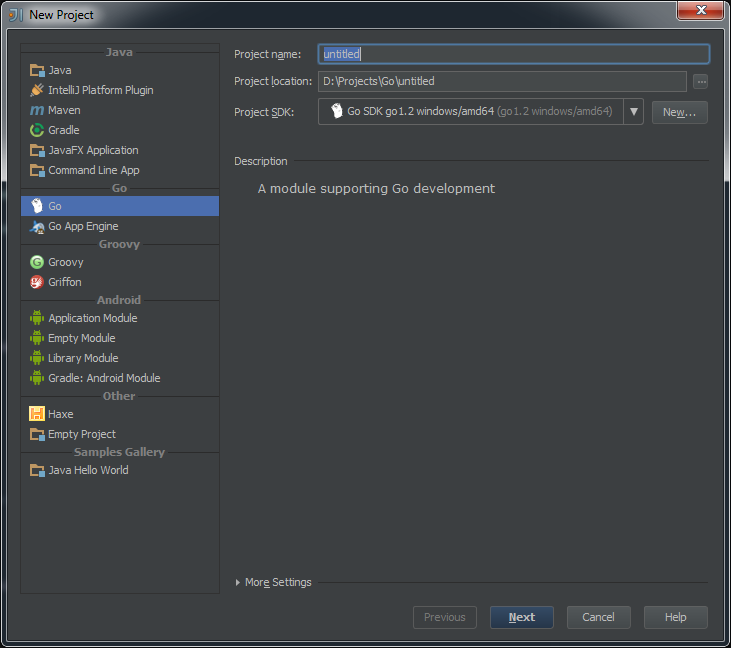
    Go SDK

    …otherwise if you install with MSI installer, the IDE won’t be able to locate and setup the SDK.

    2.) Another special attention which you have to pay is to set up the Go environment variables correctly. This means either you specify the GOROOT, GOOS, GOBIN variables per project or you set up permanently by including into the Windows default environment variables either by using the SET command line or simply by editing the existing environment variables on Control Panel -> System and Security -> System -> Advanced System Settings -> Advanced.
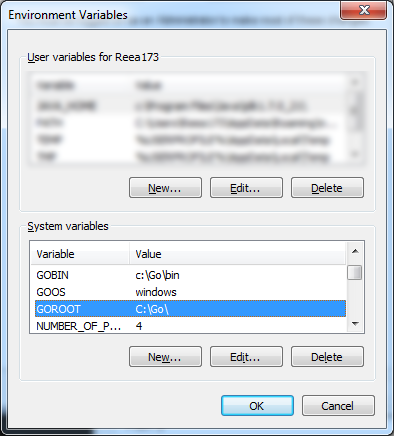
    Windows EV

    However on each project you need to setup the GOPATH variable (which need to be associated to the root of the project folder!!) by running the SET GOPATH="root\to\the\project\folder" command. This is necessary if you wish to run the build or install go commands in order to create executable files or to build the source packages.

    Quasi torture test

    After setting up the necessary prerequisites I've started to play with different type of function invocations Go can handle, one of the most referred in every torture test being the recursive function. I came up with three different methods to calculate the factorial of the first 40 numbers and measured the execution time for each one separately.

    As you can see from examples below the calculation/execution times are really impressive. The first method is the traditional one. It's execution time is the worst between the three. The second method is a demonstration how Go can handle closure functions and how can solve the same problem more elegantly. The last one is the best one using the memoization technique. What i really liked is how elegantly Go handle the closure function, being possible to define even a function as a return statement. So below are the methods, you can test it yourself by following the steps defined above.

    Conclusion

    This is the first post from - hopefully - a series of Go related entries, so along the way tinkering with the language, i'm aiming to publish more views and thoughts. In the current phase i wanted only to share my first impression and steps necessary to install Go with a IntelliJ IDEA on Windows environment.

    package main
     
    import (
    	"fmt"
    	"time"
    )
     
    const LIM = 41
    var facts [LIM]uint64
     
    func main() {
    	fmt.Println("==================FACTORIAL==================")
    	start := time.Now()
    	for i:=uint64(0); i < LIM; i++ {
    		fmt.Printf("Factorial for %d is : %d \n", i, Factorial(uint64(i)))
    	}
    	end := time.Now()
    	fmt.Printf("Calculation finished in %s \n", end.Sub(start)) //Calculation finished in 2.0002ms 
     
    	fmt.Println("==================FACTORIAL CLOSURE==================")
    	start = time.Now()
    	fact := FactorialClosure()
    	for i:=uint64(0); i < LIM; i++ {
    		fmt.Printf("Factorial closure for %d is : %d \n", uint64(i), fact(uint64(i)))
    	}
    	end = time.Now()
    	fmt.Printf("Calculation finished in %s \n", end.Sub(start)) //Calculation finished in 1ms 
     
    	fmt.Println("==================FACTORIAL MEMOIZATION==================")
    	start = time.Now()
    	var result uint64 = 0
    	for i:=uint64(0); i < LIM; i++ {
    		result = FactorialMemoization(uint64(i))
    		fmt.Printf("The factorial value for %d is %d\n", uint64(i), uint64(result))
    	}
     
    	end = time.Now()
    	fmt.Printf("Calculation finished in %s\n", end.Sub(start)) // Calculation finished in 0ms
    }
     
    func Factorial(n uint64)(result uint64) {
    	if (n > 0) {
    		result = n * Factorial(n-1)
    		return result
    	}
    	return 1
    }
     
    func FactorialClosure() func(n uint64)(uint64) {
    	var a,b uint64 = 1, 1
    	return func(n uint64)(uint64) {
    		if (n > 1) {
    			a, b = b, uint64(n) * uint64(b)
    		} else {
    			return 1
    		}
     
    		return b
    	}
    }
     
    func FactorialMemoization(n uint64)(res uint64) {
    	if (facts[n] != 0) {
    		res = facts[n]
    		return res
    	}
     
    	if (n > 0) {
    		res = n * FactorialMemoization(n-1)
    		return res
    	}
     
    	return 1
    }

    And here is the gist: Download gist
  • First impressions about Typescript, the new authoring tool from Microsoft

    First impressions about Typescript, the new authoring tool from Microsoft

    In this blog post i want to share my first impression about Typescript, the new programming language from Microsoft.

    The background

    Coming from Flash/Actionscript, and having done almost all my experiments in AS3, facing the loose typing nature of JavaScript was a bit daunting for me. Over the time I got familiarized myself with all the mystical parts of JavaScript, with it’s prototyping nature, with the strange fact that JS hasn’t a type interface, and you can declare a variable without declaring the type of that variable. In fact all the declared variables can take any type of value, and assigning a different type of value to the variable wont make the compiler to trow an exception (only if we force to do so). This proved to be the weakness of JavaScript and the most acclaimed factor which stand in front of developing highly scalable applications.

    wo

    The first question that may arise is what is Typescript? The answer is: Typescript is a superset of JavaScript which compiles to JavaScript at runtime, all while maintaining your existing code and using the existing libraries. And why Typescript? The short answer: because Typescript is awesome. The long answer will follow.

    One of the main benefits using typescript is code validation at compile time and compilation to native Javascript file at the runtime.

    This differentiate Typescript from other competitors, nominating mainly two contenders: DART ( which is a very heavy assault initiative from Google meant to eliminate all the weakness and flawless of JavaScript, introducing a completely new language, having as target not less than being the web native language), and Coffescript which is a syntactic sugar of Javascript, which compile to Javascript. Typescript somehow break in the middle of the two, because DART is a fundamentally and completely different language than Javascript, with strong typing, traditional class  structures, modules etc. On the other hand Coffescript embraced the new ECMA-6 (Harmony) features like classes,  import modules (only when required) etc, but it’s weakness is the same as of Javascript: the absence of type annotation and a very limited or almost completely absent feedback response and lack of debugging tools. This got managed by TypeScript.

    Getting started

    I won’t go into much details how to get started with Typescript. You can download the source from the official page of the language: http://www.typescriptlang.org/, then if you are a Windows 8 or at least Windows 7 user and preferably (not my case) .NET developer you’ll have a very easy time to get started with coding. There is a plugin for Microsoft Visual Studio 2012 downloadable from the same source. I’ve tried installing on Vista, after too many trials and errors finally got working, unfortunately without code highlighting and code completion. So in the end decided to write a plugin for Sublime Text 2 editor (my editor of choice). Here is the Stackoverflow thread explaining the process to automate the code transcription from TS to JS. The only weakness is – at the time of this writing –  there isn’t a code completion and live time error checking plugin implemented. A good news is that Webstorm 6.0 is already offering support for Typescript. This article summarize in a few words the capabilities of Typescript in Webstorm perspective: http://joeriks.com/2012/11/20/a-first-look-at-the-typescript-support-in-webstorm-6-eap/.

    There is a live playground available for online experimentation with a few samples at disposal: http://www.typescriptlang.org/Playground/

    Things I liked in Typescript

    Static value declaration

    As i said earlier declaring a variable in JS is simply assigning a value to it, the rest of internal operations are up to the JIT compiler. This is the root of many unwanted errors which happens when we unconsciously  messing up different types of values with the originally declared variable. Typescript helps to resolve this issue by allowing to statically declare the variable type. If no type has been specified the type any is inferred.

    var num: number = 20;

    which compiles to JS as:

    var num = 20;

    The only chance in JS to get feedback about the errors is to use test cases by covering all the possible errors you might expect:

    if typeof num !== "number" {
       throw new Error(num, " is not a number");
    }

    On the other hand TS informs instantly about the errors as you type.

    Arrow function expression

    Another great feature is the addition of the so called arrow function expression. These are useful on situations when we need to preserve the scope of the outer execution context. A common practice widespread among JS developers is to bind this to a variable self which we place outside the inner function.
    A function expression using the function keyword introduces a new dynamically bound this, whereas an arrow function expression preserves the this of its enclosing context. These are particularly useful in situation when we need to write callbacks like in the following example.

    function sayHello(message:string, callback:()=>any) {
    	alert(message);
    	setTimeout(callback, 2000);
    }
    
    sayHello("Welcome visitor", function() {
    	alert("thank you");	
    });

    Classes, modules, interfaces

    Probably the greatest addition of Typescript is the possibility to work with classes, modules and interfaces.

    Interfaces

    Let’s start with interfaces. In Typescript interfaces have only a contextual scope, they haven’t any runtime representations of the compiled code. Their role is only to create a syntactic structure, a shell which is particular useful for object properties validation, in other words for documenting and validating the required shape of properties, objects passed as parameters, and objects returned from functions. In TS, interfaces are actually object types. While in Actionscript you have to have a class to implement the interface, in TS a simple object can implement it. Here is how you declare interfaces in TS:

    interface Person {
    	name: string;
    	age?: number;
    }
    
    function print(person: Person) {
    	if (person.age) {
    		alert("Welcome " + person.name + " you are " + person.age + " age");	
    	} else {
    		alert("Welcome " + person.name);
    	}
    	
    }
    
    print({name: "George", age:22});

    Furthermore interfaces have function overloading features which means that you can pass two identical functions on the same interface and let the user decide at the implementation phase which function wants to implement:

    interface Overload {
    	foo(s:string): string;
    	foo(n:number): number;
    }
    
    function process(o:Overload) {
    	o.foo("string");
    	o.foo(23);
    }

    Another very interesting particularity of Typescript is that above the support offered for overloading functions, this is applicable for constructors too. This way we can redefine multiple constructor only by changing the way we implement it.

    var canvas = document.createElement("canvas");
    document.body.appendChild(canvas);
    var ctx = canvas.getContext('2d');
    
    interface ICircle {
    	x: number;
    	y: number;
    	radius: number;
    	color?: string;
    }
    
    class Circle {
    	public x: number;
    	public y: number;
    	public radius: number;
    	public color: string = "#000";
    	
    	constructor () {}		
    	
    	constructor () { 
    		this.x = Math.random() * canvas.width;
    		this.y = Math.random() * canvas.height;
    		this.radius = 40;
    	}		 		
    	
    	constructor (circle: ICircle = {x:Math.random() * canvas.width, y:Math.random() * canvas.height, radius:20}) {
    		this.x = circle.x;
    		this.y = circle.y;
    		this.radius = circle.radius;
    	}
    }
    
    var c = new Circle();
    ctx.fillStyle = c.color;
    ctx.beginPath();
    ctx.arc(c.x, c.y, c.radius, 0, Math.PI * 2, true);
    ctx.closePath();
    ctx.fill();

    Classes

    The most advanced feature of Typescript (from my point of view) is the addition of the more traditional class structure with all the hotness like inheritance, polymorphism, constructor functions etc. In Typescript we are declaring the class in the following way:

    class Point {
    	x: number;
    	y: number;
    	
    	constructor(x: number, y: number) {
    		this.x = x;
    		this.y = y;
    	}
    	
    	sqrt() {
    
    		return Math.sqrt(this.x * this.x + this.y * this.y) 
    	}
    	
    	print(callback?) {		 
    		setTimeout(callback, 3000);
    		
    	}
    }
    
    class Point3D extends Point {	
    	z : number;
    	
    	constructor ( x:number,  y: number, z: number) {
    		super(x, y);
    	}
    	
    	sqrt() {
    		var d = super.sqrt();
    		return Math.sqrt(d * d + this.z * this.z);
    	}
    }
    
    var p = new Point(20, 20);
    p.print(() => { alert (p.sqrt()); });

    … which in Javascript compiles to:

    var __extends = this.__extends || function (d, b) {
        function __() { this.constructor = d; }
        __.prototype = b.prototype;
        d.prototype = new __();
    };
    var Point = (function () {
        function Point(x, y) {
            this.x = x;
            this.y = y;
        }
        Point.prototype.sqrt = function () {
            return Math.sqrt(this.x * this.x + this.y * this.y);
        };
        Point.prototype.print = function (callback) {
            setTimeout(callback, 3000);
        };
        return Point;
    })();
    var Point3D = (function (_super) {
        __extends(Point3D, _super);
        function Point3D(x, y, z) {
            _super.call(this, x, y);
        }
        Point3D.prototype.sqrt = function () {
            var d = _super.prototype.sqrt.call(this);
            return Math.sqrt(d * d + this.z * this.z);
        };
        return Point3D;
    })(Point);
    var p = new Point(20, 20);
    p.print(function () {
        alert(p.sqrt());
    });

    Analyzing the code we observe that it share almost the same principle like any other static type language. We declare the class, it’s variables and functions, which can be static, private and public. By default the declared functions and variables are public, but we can make them private or static, by placing the private or static keyword in front of them. TS supports the constructor functions, which we declare in the following format:

    var1:type;
    var2:type;
    constructor (var1:type, var2:type...varn:type) {
           this.var1 = var1;
           this.var2 = var2;
           .
           .
           .
           this.varn = varn;
    }

    It’s possible to declare the constructor arguments type as public and then we can eliminate to assign the constructor function parameters to constructor’s variables.

    Typescript facilitates the working with classes by introducing another two great features commonly used in OOP, namely the inheritance and class extension. I rewrite the above code sample to show with a few simple changes we can extend the existing code to embrace some advanced polymorphism methods:

    class Point {
    	x: number;
    	y: number;
    	
    	constructor(x: number, y: number) {
    		this.x = x;
    		this.y = y;
    	}
    	
    	sqrt(x:number, y:number):number {		
    		return Math.sqrt(x * x + y * y); 
    	}
    	
    	dist(p:Point):number {
    		var dx: number = this.x - p.x;
    		var dy: number = this.y - p.y;
    		
    		return this.sqrt(dx, dy);
    	}
    	
    	print(callback?) {		 
    		setTimeout(callback, 3000);
    		
    	}
    }
    
    class Point3D extends Point {	
    	z : number;
    	
    	constructor ( x:number,  y: number, z: number) {
    		super(x, y);
    	}
    	
    	sqrt3(z:number) {
    		var s = super.sqrt(this.x, this.y);
    		return Math.sqrt(s * s + this.z * this.z);		
    	}	
    		
    	dist(p:Point3D):number {
    		var d = super.dist(p);		
    		var dz: number = this.z - p.z;										
    		return this.sqrt3(dz);
    	}
    }
    
    var p = new Point3D(19, 20, 20);
    p.print(() => { alert (p.dist(new Point3D(2,2,20))); });

    Modules

    The last topic i want to discuss is about modules. Typescript module implementation is closely aligned with ECMAScript 6 proposal and supports code generation, targeting AMD and CommonJS modules. There are two types of source files Typescript is supporting: implementation source files and declaration source files. The difference between the two is that the first one contains statements and declarations, on the other hand the second contains only declarations. These can be used to declare static type information associated with existing javascript code. By default, a JavaScript output file is generated for each implementation source file in a compilation, but no output is generated from declaration source files.

    The scope of modules is to maintain a clean structure in our code and to prevent the global namespace pollution. If suppose i have to create a global function Main the way i do in Javascript without to override the function at a later stage is to assure that the Main function get initialized only once. This is a common technique widespread among JS developers. In TS we do in the following way:

    module net.esimov.core {
    	export class Main {
    		public name: string;
    		public interest: string;
    		
    		constructor() {
    			this.name = "esimov";
    			this.interest = "web technology";
    		}
    		
    		puts() {
    			console.log(this.name, " like", this.interest);
    		}
    	}
    }

    Importing the declaration files is simple as placing the following statement on the top of our code: /// <reference path="...";/>. Then with a simple import statement we’ll import the modules needed at one specific moment.

    import Core = net.esimov.core;
    var c = new Core.Main();

    Final thoughts

    Typescript is a language that is definitely worth to try it. Unfortunately it has one main disadvantage, namely to benefit from it’s strong typing features we need to declare and construct declaration files for libraries we want to include in our projects. There are predefined declaration files for jQuery, node.js and d3.js, just to mention a few, but hopefully as the community will grow this list will get bigger and bigger.

    Another weak point is the lack of support from IDE’s other than MS Visual Studio, but fortunately Webstorm 6 has in perspective to include full type support for Typescript too.

    What’s next?

    With this introduction done, my intention is to put into real usage all the information and learning accumulated and trying to create some canvas experiments but this time using Typescript. So check out soon.

    Other resources to check