Category: Javascript

  • Porting Pigo face detection library to Webassembly (WASM)

    Porting Pigo face detection library to Webassembly (WASM)

    Pigo Wasm

    In the last couple of occasions I wrote about the Pigo face detection library I have developed in Go. This article is another one from the series, but this time I’m focusing on WASM (Webassambly) integration. This is another key milestone in the library evolution, considering that when I started this project the library was capable only for face detection. Later on the library has been extended to support pupils/eyes localization, then facial landmark points detection and it has also been adapted to be integrated into different programming languages as a shared object library (SO). I’m pretty delighted about the great acceptance and support received during the development from the programming community, the library being featured a couple of times in https://golangweekly.com/, received 2.5k stars on the repo Github page (and still counting), getting many positive feedback on Reddit, which means it payed back the efforts.

    But first what is WASM? To quote the https://webassembly.org/ homepage:

    Quote leftWebAssembly (abbreviated Wasm) is a binary instruction format for a stack-based virtual machine. Wasm is designed as a portable target for compilation of high-level languages like C/C++/Rust, enabling deployment on the web for client and server applications.Quote right

    In other words this means that compiling and porting a native application to the WASM standard will give the generated web application a speed almost equal to the native one.

    Starting from v1.11 an experimental support for WASM has been included into the Go language, which has been extended on v1.12 and v1.13. As I mentioned in the previous articles Go suffers terrible in terms of native and platform agnostic webcam support and as of my knowledge currently there is no single webcam library in the Go ecosystem which is platform independent. This was the reason why, to prove the library real time face detection capabilities, I opted to lean on exporting the main function as a shared object library, but lately this proved to be inefficient in terms of real time performance, since on each frame the Python app had to transfer the pixel array to the Go app (where the face detection operation is happening) and get back the detected faces coordinates. Of course because of the two way (back and forth) communication, this process fall back considerably in terms of pure performance.

    WASM to the rescue

    As I mentioned above starting from v1.11 the standard Go code base now includes the syscall/js package which targets WASM. However the API has been refactored and gone trough a few iterations to became stable as of v1.13. This also means that the WASM API of v1.13 is no more compatible with the v1.11. The API became so mature that there is no need to use external libraries targeting the Javascript runtime in Go, like Gopherjs.

    In order to compile for Webassambly we need to explicitly specify and set the GOOS=js and GOARCH=wasm environment variables on the building process. Running the below command will build the package and produce a .wasm executable Webassambly module file.

    $ GOOS=js GOARCH=wasm go build -o lib.wasm wasm.go

    This file then can be referenced in the main html file.

    That’s the only thing we need to do in order to have fully functional WASM application. The hardest part is coming afterwards. When we are targeting WASM there are a few takeaways we need to keep in mind in order the implementation to run as smooth as possible:

    1. To have access to a Javascript global variable in Go we have to call the js.Global() function.
    2. To call a JS object method we have to use the Call() function.
    3. To get or set an attribute of a JS object or Html element we can call the Get() or Set() functions.
    4. Probably the trickiest part of the Go Wasm port is related to the callback functions, and there are a lot of places where we need to take care of them. One of the most important one is the canvas requestAnimationFrame method, which accepts as a second argument a callback function. Now to invoke this method in Go we need to apply to the js.FuncOf(func(this js.Value, args []js.Value) interface{}{...} function, where the second argument is the callback function argument. A very important note: the function body should be called inside a goroutine, otherwise you’ll get a deadlock runtime exception. You can check the package documentation here: https://godoc.org/syscall/js

    The implementation details

    Now let’s take a deep breath and roll into the implementation details. One of the key components of the face detection application is the binary cascade file parser. Since in normal circumstances, when we are fetching and parsing the binary files locally, we can rely on the os system package, this is not the case on WASM, because we do not have access to the system environment. This means that we cannot load and parse the files sitting on our local storage. We need to fetch them through the supported Javascript methods like the fetch method. In Javascript this method returns a promise with two arguments: a success and a failure. As I mentioned previously the callback functions needs to be invoked in separate goroutines and the most straightforward way to orchestrate the results when we are dealing with goroutines is to use channels. So the fetch method should return the parsed binary file as a byte array and an error in case of a failure.

    The rest of the implementation does not differ in anything from the Unpack() method presented in the previous article. Once we get binary array there is nothing left over just to unpack the cascade file, transform it to the desired shape and extract the relevant information.

    I won’t go into too much details about the detection algorithm itself, since I’ve discussed it in the previous articles. I will detail what’s most important in the perspective of the WASM integration. Another key importance part in the WASM integration is related to the webcam rendering operation. In Javascript we can access the webcam in the following way:

    We can translate this snippet to Go (WASM) code in the following way:

    This will return a canvas object (struct) over it we can call the rendering method itself. In the background this will trigger the requestAnimationFrame JS method, drawing each webcam frame to a dynamically created image element. From there we can extract the pixel values calling the getImageData HTML5 canvas method. Since this will return an object of type ImageData which values are of Uint8ClampedArray, these needs to be converted to a type supported by the Go WASM API. The only supported uint type in the Go syscall/js API is uint8, so the most suitable way is to convert the Uint8ClampedArray to Uint8Array. We can do this by calling the following method:

    The code below shows the rendering method. It’s a pretty common Javascript code adapted to WASM Go, including the code responsible for the face detection, but this have been discussed in the previous articles. The most important part is the type conversion, without that we are just getting a compiler error.

    And to put all together, in the main function we are just calling the webcam Render() method, once the webcam has been initialized, otherwise an alert telling that the webcam was not detected.


    The end result

    Voila, we are done. Here is how the Webassambly version of Pigo looks like in realtime. Pretty good, huh? That’s, all, thanks for reading and if you like my works you can follow me on Twitter or give it a star on the project Github repo: https://github.com/esimov/pigo.

  • Perlin noise based Minecraft rendering experiment

    Perlin noise based Minecraft rendering experiment

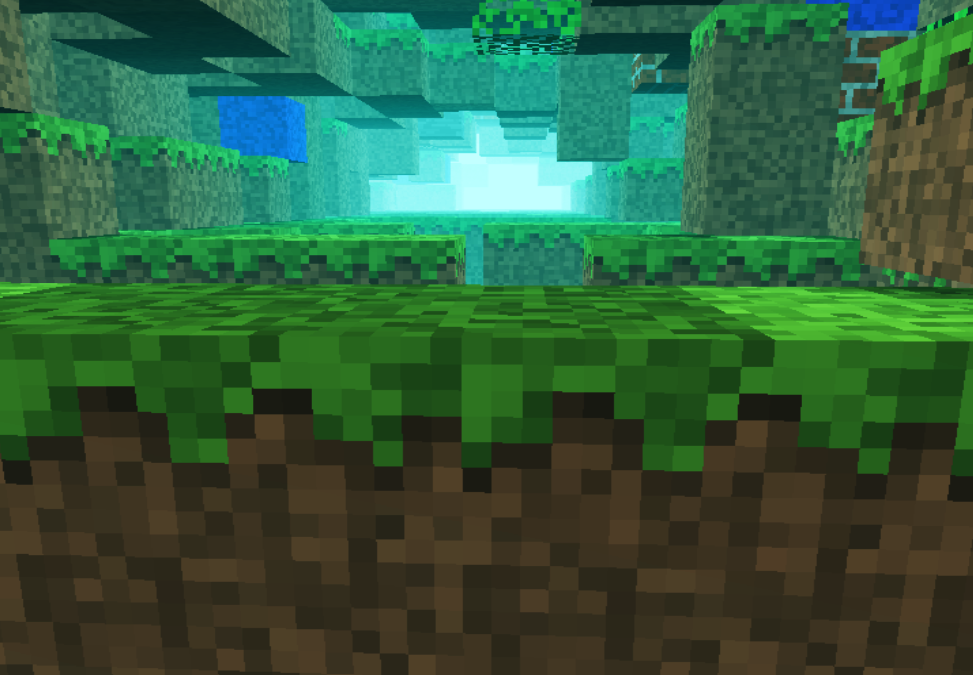
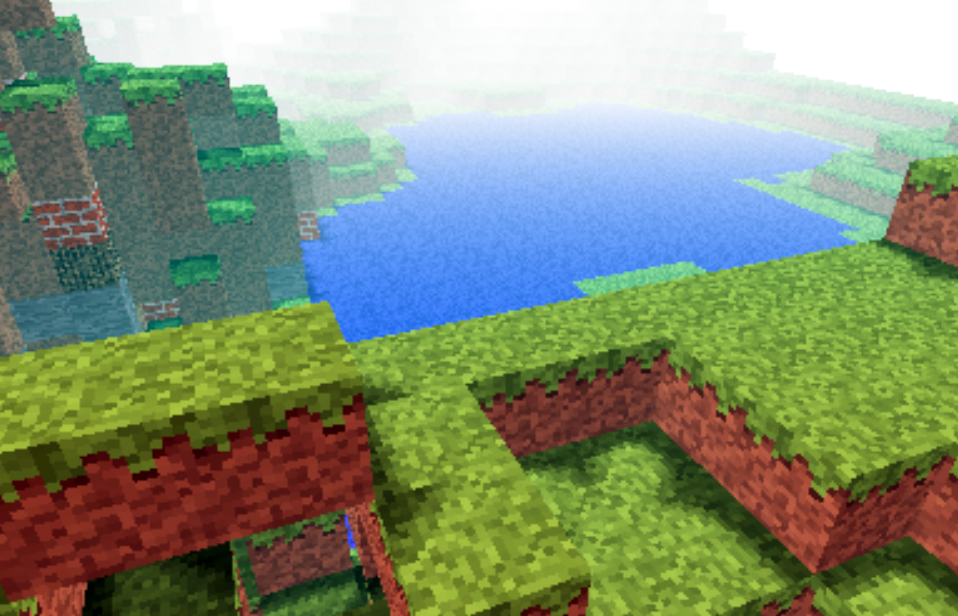
    Recently i was involved in a few different commercial projects, was toying with Golang, the shiny new language from Google and made some small snippets to test the language capability (i put them in my gist repository). In conclusion i somehow completely missed the creative coding. I had a few ideas and conceptions which i wanted to realize at an earlier or later stage. One of them was to adapt Notch minecraft renderer to be used in combination with perlin or simplex noise for generating random rendering maps.

    minecraft

    For that reason i ported to Javascript the original perlin noise algorithm written in Java. You can find the code here: https://gist.github.com/esimov/586a439f53f62f67083e. I won’t go into much details of how the perlin noise algorithm is working, if you are interested you can find a well explained paper here: http://webstaff.itn.liu.se/~stegu/simplexnoise/simplexnoise.pdf.

    As a starting point I put together a small experiment creating randomly generated perlin noise maps, and testing the granularity and dispersion of randomly selected seeding points to see how much they can be customized to create different noise patterns. I’m honest, actually these maps are not 100% randomly distributed, although they can be randomly seeded too, but for our scope I used a pretty neat algorithm for uniform granularity:

    
    // Seeded random number generator
    function seed(x) {
        x = (x<<13) ^ x;
        return ( 1.0 - ( (x * (x * x * 15731 + 789221) + 1376312589) & 0x7fffffff) / 1073741824.0);
    }
    

    And here is the working example:

    See the Pen Perlin metaball by Endre Simo (@esimov) on CodePen.

    The question that may arise: why should we need the perlin noise “thing” to generate different minecraft styled procedural terrain map? By generating randomly distributed noise we can further adjust the color mapping, then extract some of the areas above or below to certain values, which at a later state we can combine or even integrate into the core map generation logic. If you look at the alchemy behind the code responsible for programatically generating the terrain blocks, you will soon realize that we have all the ingredients (by manipulating some pixels here and there) to integrate the noise map into the block generation algorithm.

    In InitMap function we populate the map array with some initial values, then at a later stage after we generate the noise map, we extract the data as follows:

    
    for (var cell = 0; cell < pixels.length; cell += 4) {
        var ii = Math.floor(cell/4);
        var x = ii % canvasWidth;
        var y = Math.floor(ii / canvasWidth);
        var xx = 123 + x * .02;
        var yy = 324 + y * .02;
        
        var value = Math.floor((perlin.noise(xx,yy,1))*256);              
        pixels[cell] = pixels[cell + 1] = pixels[cell + 2] = value;
        pixels[cell + 3] = 255; // alpha.
    }
    

    then we go through the pixels data, setting up the condition on which data should be processed. In our actual case if the pixel color extracted is below to some certain value (this values are actually values extracted from the perlin noise map) then we set the map data to 0. This is why the perlin noise seed granularity is important. As smoother the transition between points is, as subtle would be the map generated.

    
    if ((pixelCol & 0xff * 0.48) < (64 - y) << 2) {
        map[i] = 0;
    }
    

    This is the basic logic for generating random minecraft terrain. We can even adjust the seed offset in perlin noise script to generate different patterns, however in my experiment seems that this doesn’t matter to much.

    The rendering engine is based on notch code, however i made some optimization adding some fake shadows and distance fog, creating a more ambiental environment.

    This is the code which creates the distance fog effect:

    
    var r = ((col >> 16) & 0xff) * br * ddist / (255 * 255);
    var g = ((col >> 8) & 0xff) * br * ddist / (255 * 255);
    var b = ((col) & 0xff) * br * ddist / (255 * 255);
    
    if(ddist <= 155) r += 155-ddist;
    if(ddist <= 255) g += 255-ddist;
    if(ddist <= 255) b += 255-ddist;  
    
    pixels[(x + y * w) * 4 + 0] = r;
    pixels[(x + y * w) * 4 + 1] = g;
    pixels[(x + y * w) * 4 + 2] = b;
    

    Playing with values i discovered that actually i can “move the camera around the scene” (actually here we have a fictive camera, meaning that not the camera is moving around scene, but the objects are projected around some fictive coordinates), so it was quite easy to get the mouse position and adjust the camera relative to the mouse position, this way including some user interaction into the scene.

    Version 2

    Even tough the desired effect pretty much satisfied my expectations, something was really missing from the original version: it was not possible to generate randomly seeded terrain maps and also the generated map was pretty much the same. So I have extended the first version with random map generation, replaced the Perlin noise generator with the simplex noise, added fake shadow and fog to give the feeling of depth and on top of these i have also included a control panel to play with the values. This is how it came out:

    The source code can be found on my Github page:

    https://github.com/esimov/minecraft.js

  • Navier Stokes Fluid Simulation on HTML5 Canvas

    Navier Stokes Fluid Simulation on HTML5 Canvas

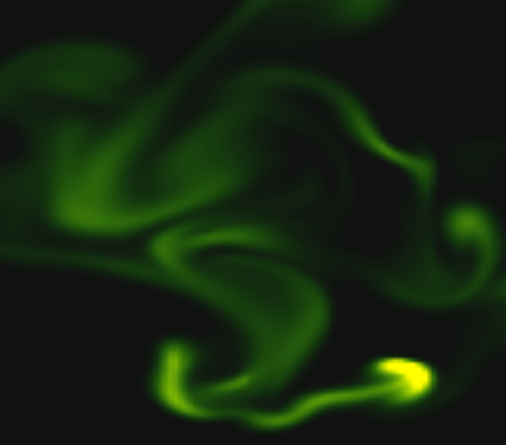
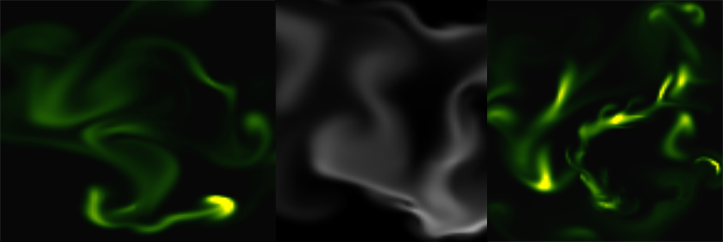
    Implementing real time fluid simulation in pure Javascript was a long desire of me and has been sitting in my todo list from a long time on. However from various reasons i never found enough time to start working on it. I know it’s nothing new and there are quite a few implementations done on canvas already (maybe the best known is this: http://nerget.com/fluidSim/), but i wanted to do mine without to relay to others work and to use the core logic as found on the original paper.

    For me one of the most inspiring real-time 2D fluid simulations based on Navier Stokes equations was that created by Memo Akten, originally implemented in Processing (a Java based programming language, very suitable for digital artists for visual experimentation), lately ported to OpenFrameworks (a C++ framework) then implemented in AS 3.0 by Eugene Zatepyakin http://blog.inspirit.ru/?p=248.

    The code is based on Jos Stam’s famous paper – Real-Time Fluid Dynamics for Games, but another useful resource which i found during preparation and development was a paper from Mike Ash: Fluid Simulation for Dummies. As the title suggest, the concept is explained very clearly even if the equations behind are quite complex, which means without a good background in physics and differential equations it’s difficult to understand. This does not means that i’m a little genius in maths or physics :). In this post i will sketch briefly some of the main concepts behind the theory and more importantly how can be implemented in Javascript. As a side note, this simulation does not take advantages of the GPU power, so it’s not running on WebGL. For a WebGL implementation see http://www.ibiblio.org/e-notes/webgl/gpu/fluid.htm.

    fluid-solvers

    The basic concept

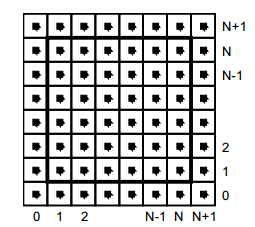
    We can think of fluids as a collection of cells or boxes (in 3D), each one interacting with it’s neighbor. Each cell has some basic properties like velocity and density and the transformation taking place in one cell is affecting the properties of neighbor cells (all of these happening million times per second).
    fluid-cells

    Being such a complex operation, computers (even the most powerful ones) can not simulate real time the fluid dynamics. For this we need to make some compromise. We’ll break the fluid up into a reasonable number of cells and try to do several interactions per second. That’s what Jos Stam’s approaching is doing great: sacrifice the fluid accuracy for a better visual presentation, more suitable for running real time. The best way to improve the simulation fluency is to reduce the solver iteration number. We’ll talk about this a little bit later.

    First we are staring by initializing some basic properties like the number of cells, the length of the timestamp, the amount of diffusion and viscosity etc. Also we need a density array and a velocity array and for each of them we set up a temporary array to switch the values between the new and old ones. This way we can store the old values while computing the new ones. Once we are done with the iteration we need to reset all the values to the default ones. For efficiency purposes we’ll use single dimensional array over double ones.

    The first step is to add some density to our cells:

    function addDensitySource(x, x0) {                
    	var size = self.numCells;        
    	while(size-- > -1) {
    		x[size] += _dt * x0[size];
    	}
    }

    then to add some velocity:

    FSolver.prototype.addCellVelocity = function() {
    	var size = self.numCells;
    	while(size-- > -1) {
    		if (isNaN(self.u[size])) continue;
    		self.u[size] += _dt * self.uOld[size];
    		if (isNaN(self.v[size])) continue;
    		self.v[size] += _dt * self.vOld[size];
    	}
    }

    Because some of the functions needs to be accessible only from main script i separated the internal (private) functions from the external (public) functions. But because Javascript is a prototypical language i used the object prototype method to extend it. That’s why some of the methods are declared with prototype and others as simple functions. However these aren’t accessible from the outside of FS namespace, which is declared as a global namespace. For this technique please see this great article Learning JavaScript Design Patterns.

    The process

    The basic structure of our solver is as follows. We start with some initial state for the velocity and the density and then update its values according to events happening in the environment.
    In our prototype we let the user apply forces and add density sources with the mouse (or we can extend this to touching devices too). There are many other possibilities this can be extended.

    Basically to simulate the fluid dynamics we need to familiarize our self with three main operations:

    Diffusion:

    Diffusion is the process when – in our case – the liquids doesn’t stay still, but are spreading out. Through diffusion each cell exchanges density with its direct neighbors. The array for the density is filled in from the user’s mouse movement. The cell’s density will decrease by losing density to its neighbors, but will also increase due to densities flowing in from the neighbors.

    Projection:

    This means the amount of fluid going in has to be exactly equal with the amount of fluid going out, otherwise may happens that the net inflow in some cells to be higher or lower than the net inflow of the neighbor cells. This may cause the simulation to react completely chaotic. This operation runs through all the cells and fixes them up to maintain in equilibrium.

    Advection:

    The key idea behind advection is that moving densities would be easy to solve if the density were modeled as a set of particles. In this case we would simply have to trace the particles though the velocity field. For example, we could pretend that each grid cell’s center is a particle and trace it through the velocity field. So advection in fact is a velocity applied to each grid cell. This is what makes things move.

    setBoundary():

    We assume that the fluid is contained in a box with solid walls: no flow should exit the walls. This simply means that the horizontal component of the velocity should be zero on the vertical walls, while the vertical component of the velocity should be zero on the horizontal walls. So in fact every velocity in the layer next to the outer layer is mirrored. The following code checks the boundaries of fluid cells.

    function setBoundary(bound, x) {
    	var dst1, dst2, src1, src2, i;
    	var step = FLUID_IX(0, 1) - FLUID_IX(0, 0);
    	dst1 = FLUID_IX(0, 1);
    	src1 = FLUID_IX(1, 1);
    	dst2 = FLUID_IX(_NX+1, 1);
    	src2 = FLUID_IX(_NX, 1);
    
    	if (wrap_x) {
    		src1 ^= src2;
    		src2 ^= src1;
    		src1 ^= src2;
    	}
    
    	if (bound == 1 && !wrap_x) {
    		for (i = _NY; i > 0; --i) {
    			x[dst1] = -x[src1]; dst1 += step; src1 += step;
    			x[dst2] = -x[src2]; dst2 += step; src2 += step;
    		}
    	} else {
    		for (i = _NY; i > 0; --i) {
    			x[dst1] = x[src1]; dst1 += step; src1 += step;
    			x[dst2] = x[src2]; dst2 += step; src2 += step;
    		}
    	}
    
    	dst1 = FLUID_IX(1, 0);
    	src1 = FLUID_IX(1, 1);
    	dst2 = FLUID_IX(1, _NY+1);
    	src2 = FLUID_IX(1, _NY);
    
    	if (wrap_y) {
    		src1 ^= src2;
    		src2 ^= src1;
    		src1 ^= src2;
    	}
    
    	if (bound == 2 && !wrap_y) {
    		for (i = _NX; i > 0 ; --i) {
    			x[dst1++] = -x[src1++];
    			x[dst2++] = -x[src2++];
    		}
    	} else {
    		for (i = _NX; i > 0; --i) {
    			x[dst1++] = x[src1++];
    			x[dst2++] = x[src2++];
    		}
    	}
    
    	x[FLUID_IX(0, 0)] = .5 * (x[FLUID_IX(1, 0)] + x[FLUID_IX(0, 1)]);
    	x[FLUID_IX(0, _NY+1)] = .5 * (x[FLUID_IX(1, _NY+1)] + x[FLUID_IX(0, _NY)]);
    	x[FLUID_IX(_NX+1, 0)] = .5 * (x[FLUID_IX(_NX, 0)] + x[FLUID_IX(_NX+1, _NX)]);
    	x[FLUID_IX(_NX+1, _NY+1)] = .5 * (x[FLUID_IX(_NX, _NY+1)] + x[FLUID_IX(_NX+1, _NY)]);
    }

    The main simulation function is implemented as follow:

    FSolver.prototype.updateDensity = function() {        
    	addDensitySource(this.density, this.densityOld);
    
    	if (_doVorticityConfinement) {            
    		calcVorticityConfinement(this.uOld, this.vOld);            
    	}
    
    	diffuse(0, this.densityOld, this.density, 0);
    	advect(0, this.density, this.densityOld, this.u, this.v);
    }
    
    FSolver.prototype.updateVelocity = function() {
    	this.addCellVelocity();
    	this.SWAP('uOld', 'u');
    	diffuse(1, this.u, this.uOld, _visc);
    	this.SWAP('vOld', 'v');        
    	diffuse(2, this.v, this.vOld, _visc);        
    	project(this.u, this.v, this.uOld, this.vOld);
    
    	this.SWAP('uOld', 'u');
    	this.SWAP('vOld', 'v');
    	advect(1, this.u, this.uOld, this.uOld, this.vOld);
    	advect(2, this.v, this.vOld, this.uOld, this.vOld);
    	project(this.u, this.v, this.uOld, this.vOld);
    }

    We are calling these functions on each frame on the main drawing method. For rendering the cells i used canvas putImageData() method which accepts as parameter an image data, whose values are in fact the fluid solver values obtained from the density array. My first attempt was to generate a particle field, associate to each particle density, velocity etc. (so all the data necessarily making a fluid simulation), connect each particle in a single linked list, knowing this is a much faster method for constructing an array, instead using the traditional one. Then using a fast and efficient method to trace a line, best known as Extremely Fast Line Algorithm or Xiaolin Wu’s line algorithm with anti aliasing (http://www.bytearray.org/?p=67) i thought i could gain more FPS for a smoother animation, but turned out being a very buggy implementation, so for the moment i abandoned the idea, but i will revised once i will have more time. Anyway i don’t swipe out this code part. You can find some utility functions too for my attempting, like implementing the AS3 Bitmap and BitmapData classes.

    And here is the monochrome version:
    www.esimov.com/experiments/javascript/fluid-solver-mono/

    The simulation is fully adapted to touch devices, but i think you need a really powerful device to run the fluid simulation decently.

    What’s next?

    That’s all. Hopefully this will be a solid base to explore further this field and add some extra functionality.

  • First impressions about Typescript, the new authoring tool from Microsoft

    First impressions about Typescript, the new authoring tool from Microsoft

    In this blog post i want to share my first impression about Typescript, the new programming language from Microsoft.

    The background

    Coming from Flash/Actionscript, and having done almost all my experiments in AS3, facing the loose typing nature of JavaScript was a bit daunting for me. Over the time I got familiarized myself with all the mystical parts of JavaScript, with it’s prototyping nature, with the strange fact that JS hasn’t a type interface, and you can declare a variable without declaring the type of that variable. In fact all the declared variables can take any type of value, and assigning a different type of value to the variable wont make the compiler to trow an exception (only if we force to do so). This proved to be the weakness of JavaScript and the most acclaimed factor which stand in front of developing highly scalable applications.

    wo

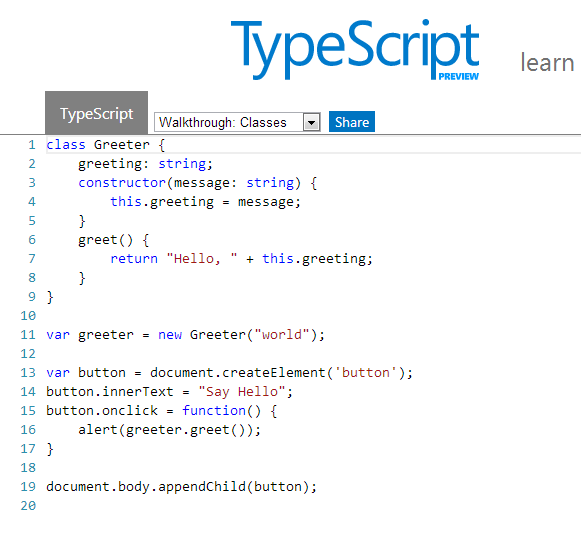
    The first question that may arise is what is Typescript? The answer is: Typescript is a superset of JavaScript which compiles to JavaScript at runtime, all while maintaining your existing code and using the existing libraries. And why Typescript? The short answer: because Typescript is awesome. The long answer will follow.

    One of the main benefits using typescript is code validation at compile time and compilation to native Javascript file at the runtime.

    This differentiate Typescript from other competitors, nominating mainly two contenders: DART ( which is a very heavy assault initiative from Google meant to eliminate all the weakness and flawless of JavaScript, introducing a completely new language, having as target not less than being the web native language), and Coffescript which is a syntactic sugar of Javascript, which compile to Javascript. Typescript somehow break in the middle of the two, because DART is a fundamentally and completely different language than Javascript, with strong typing, traditional class  structures, modules etc. On the other hand Coffescript embraced the new ECMA-6 (Harmony) features like classes,  import modules (only when required) etc, but it’s weakness is the same as of Javascript: the absence of type annotation and a very limited or almost completely absent feedback response and lack of debugging tools. This got managed by TypeScript.

    Getting started

    I won’t go into much details how to get started with Typescript. You can download the source from the official page of the language: http://www.typescriptlang.org/, then if you are a Windows 8 or at least Windows 7 user and preferably (not my case) .NET developer you’ll have a very easy time to get started with coding. There is a plugin for Microsoft Visual Studio 2012 downloadable from the same source. I’ve tried installing on Vista, after too many trials and errors finally got working, unfortunately without code highlighting and code completion. So in the end decided to write a plugin for Sublime Text 2 editor (my editor of choice). Here is the Stackoverflow thread explaining the process to automate the code transcription from TS to JS. The only weakness is – at the time of this writing –  there isn’t a code completion and live time error checking plugin implemented. A good news is that Webstorm 6.0 is already offering support for Typescript. This article summarize in a few words the capabilities of Typescript in Webstorm perspective: http://joeriks.com/2012/11/20/a-first-look-at-the-typescript-support-in-webstorm-6-eap/.

    There is a live playground available for online experimentation with a few samples at disposal: http://www.typescriptlang.org/Playground/

    Things I liked in Typescript

    Static value declaration

    As i said earlier declaring a variable in JS is simply assigning a value to it, the rest of internal operations are up to the JIT compiler. This is the root of many unwanted errors which happens when we unconsciously  messing up different types of values with the originally declared variable. Typescript helps to resolve this issue by allowing to statically declare the variable type. If no type has been specified the type any is inferred.

    var num: number = 20;

    which compiles to JS as:

    var num = 20;

    The only chance in JS to get feedback about the errors is to use test cases by covering all the possible errors you might expect:

    if typeof num !== "number" {
       throw new Error(num, " is not a number");
    }

    On the other hand TS informs instantly about the errors as you type.

    Arrow function expression

    Another great feature is the addition of the so called arrow function expression. These are useful on situations when we need to preserve the scope of the outer execution context. A common practice widespread among JS developers is to bind this to a variable self which we place outside the inner function.
    A function expression using the function keyword introduces a new dynamically bound this, whereas an arrow function expression preserves the this of its enclosing context. These are particularly useful in situation when we need to write callbacks like in the following example.

    function sayHello(message:string, callback:()=>any) {
    	alert(message);
    	setTimeout(callback, 2000);
    }
    
    sayHello("Welcome visitor", function() {
    	alert("thank you");	
    });

    Classes, modules, interfaces

    Probably the greatest addition of Typescript is the possibility to work with classes, modules and interfaces.

    Interfaces

    Let’s start with interfaces. In Typescript interfaces have only a contextual scope, they haven’t any runtime representations of the compiled code. Their role is only to create a syntactic structure, a shell which is particular useful for object properties validation, in other words for documenting and validating the required shape of properties, objects passed as parameters, and objects returned from functions. In TS, interfaces are actually object types. While in Actionscript you have to have a class to implement the interface, in TS a simple object can implement it. Here is how you declare interfaces in TS:

    interface Person {
    	name: string;
    	age?: number;
    }
    
    function print(person: Person) {
    	if (person.age) {
    		alert("Welcome " + person.name + " you are " + person.age + " age");	
    	} else {
    		alert("Welcome " + person.name);
    	}
    	
    }
    
    print({name: "George", age:22});

    Furthermore interfaces have function overloading features which means that you can pass two identical functions on the same interface and let the user decide at the implementation phase which function wants to implement:

    interface Overload {
    	foo(s:string): string;
    	foo(n:number): number;
    }
    
    function process(o:Overload) {
    	o.foo("string");
    	o.foo(23);
    }

    Another very interesting particularity of Typescript is that above the support offered for overloading functions, this is applicable for constructors too. This way we can redefine multiple constructor only by changing the way we implement it.

    var canvas = document.createElement("canvas");
    document.body.appendChild(canvas);
    var ctx = canvas.getContext('2d');
    
    interface ICircle {
    	x: number;
    	y: number;
    	radius: number;
    	color?: string;
    }
    
    class Circle {
    	public x: number;
    	public y: number;
    	public radius: number;
    	public color: string = "#000";
    	
    	constructor () {}		
    	
    	constructor () { 
    		this.x = Math.random() * canvas.width;
    		this.y = Math.random() * canvas.height;
    		this.radius = 40;
    	}		 		
    	
    	constructor (circle: ICircle = {x:Math.random() * canvas.width, y:Math.random() * canvas.height, radius:20}) {
    		this.x = circle.x;
    		this.y = circle.y;
    		this.radius = circle.radius;
    	}
    }
    
    var c = new Circle();
    ctx.fillStyle = c.color;
    ctx.beginPath();
    ctx.arc(c.x, c.y, c.radius, 0, Math.PI * 2, true);
    ctx.closePath();
    ctx.fill();

    Classes

    The most advanced feature of Typescript (from my point of view) is the addition of the more traditional class structure with all the hotness like inheritance, polymorphism, constructor functions etc. In Typescript we are declaring the class in the following way:

    class Point {
    	x: number;
    	y: number;
    	
    	constructor(x: number, y: number) {
    		this.x = x;
    		this.y = y;
    	}
    	
    	sqrt() {
    
    		return Math.sqrt(this.x * this.x + this.y * this.y) 
    	}
    	
    	print(callback?) {		 
    		setTimeout(callback, 3000);
    		
    	}
    }
    
    class Point3D extends Point {	
    	z : number;
    	
    	constructor ( x:number,  y: number, z: number) {
    		super(x, y);
    	}
    	
    	sqrt() {
    		var d = super.sqrt();
    		return Math.sqrt(d * d + this.z * this.z);
    	}
    }
    
    var p = new Point(20, 20);
    p.print(() => { alert (p.sqrt()); });

    … which in Javascript compiles to:

    var __extends = this.__extends || function (d, b) {
        function __() { this.constructor = d; }
        __.prototype = b.prototype;
        d.prototype = new __();
    };
    var Point = (function () {
        function Point(x, y) {
            this.x = x;
            this.y = y;
        }
        Point.prototype.sqrt = function () {
            return Math.sqrt(this.x * this.x + this.y * this.y);
        };
        Point.prototype.print = function (callback) {
            setTimeout(callback, 3000);
        };
        return Point;
    })();
    var Point3D = (function (_super) {
        __extends(Point3D, _super);
        function Point3D(x, y, z) {
            _super.call(this, x, y);
        }
        Point3D.prototype.sqrt = function () {
            var d = _super.prototype.sqrt.call(this);
            return Math.sqrt(d * d + this.z * this.z);
        };
        return Point3D;
    })(Point);
    var p = new Point(20, 20);
    p.print(function () {
        alert(p.sqrt());
    });

    Analyzing the code we observe that it share almost the same principle like any other static type language. We declare the class, it’s variables and functions, which can be static, private and public. By default the declared functions and variables are public, but we can make them private or static, by placing the private or static keyword in front of them. TS supports the constructor functions, which we declare in the following format:

    var1:type;
    var2:type;
    constructor (var1:type, var2:type...varn:type) {
           this.var1 = var1;
           this.var2 = var2;
           .
           .
           .
           this.varn = varn;
    }

    It’s possible to declare the constructor arguments type as public and then we can eliminate to assign the constructor function parameters to constructor’s variables.

    Typescript facilitates the working with classes by introducing another two great features commonly used in OOP, namely the inheritance and class extension. I rewrite the above code sample to show with a few simple changes we can extend the existing code to embrace some advanced polymorphism methods:

    class Point {
    	x: number;
    	y: number;
    	
    	constructor(x: number, y: number) {
    		this.x = x;
    		this.y = y;
    	}
    	
    	sqrt(x:number, y:number):number {		
    		return Math.sqrt(x * x + y * y); 
    	}
    	
    	dist(p:Point):number {
    		var dx: number = this.x - p.x;
    		var dy: number = this.y - p.y;
    		
    		return this.sqrt(dx, dy);
    	}
    	
    	print(callback?) {		 
    		setTimeout(callback, 3000);
    		
    	}
    }
    
    class Point3D extends Point {	
    	z : number;
    	
    	constructor ( x:number,  y: number, z: number) {
    		super(x, y);
    	}
    	
    	sqrt3(z:number) {
    		var s = super.sqrt(this.x, this.y);
    		return Math.sqrt(s * s + this.z * this.z);		
    	}	
    		
    	dist(p:Point3D):number {
    		var d = super.dist(p);		
    		var dz: number = this.z - p.z;										
    		return this.sqrt3(dz);
    	}
    }
    
    var p = new Point3D(19, 20, 20);
    p.print(() => { alert (p.dist(new Point3D(2,2,20))); });

    Modules

    The last topic i want to discuss is about modules. Typescript module implementation is closely aligned with ECMAScript 6 proposal and supports code generation, targeting AMD and CommonJS modules. There are two types of source files Typescript is supporting: implementation source files and declaration source files. The difference between the two is that the first one contains statements and declarations, on the other hand the second contains only declarations. These can be used to declare static type information associated with existing javascript code. By default, a JavaScript output file is generated for each implementation source file in a compilation, but no output is generated from declaration source files.

    The scope of modules is to maintain a clean structure in our code and to prevent the global namespace pollution. If suppose i have to create a global function Main the way i do in Javascript without to override the function at a later stage is to assure that the Main function get initialized only once. This is a common technique widespread among JS developers. In TS we do in the following way:

    module net.esimov.core {
    	export class Main {
    		public name: string;
    		public interest: string;
    		
    		constructor() {
    			this.name = "esimov";
    			this.interest = "web technology";
    		}
    		
    		puts() {
    			console.log(this.name, " like", this.interest);
    		}
    	}
    }

    Importing the declaration files is simple as placing the following statement on the top of our code: /// <reference path="...";/>. Then with a simple import statement we’ll import the modules needed at one specific moment.

    import Core = net.esimov.core;
    var c = new Core.Main();

    Final thoughts

    Typescript is a language that is definitely worth to try it. Unfortunately it has one main disadvantage, namely to benefit from it’s strong typing features we need to declare and construct declaration files for libraries we want to include in our projects. There are predefined declaration files for jQuery, node.js and d3.js, just to mention a few, but hopefully as the community will grow this list will get bigger and bigger.

    Another weak point is the lack of support from IDE’s other than MS Visual Studio, but fortunately Webstorm 6 has in perspective to include full type support for Typescript too.

    What’s next?

    With this introduction done, my intention is to put into real usage all the information and learning accumulated and trying to create some canvas experiments but this time using Typescript. So check out soon.

    Other resources to check

  • Worley noise cellular texturing

    Worley noise cellular texturing

    There are some quite well known procedural content generation algorithms out there: Voronoi, Perlin noise, simplex noise, L-systems, reaction-diffusion systems like Turing pattern, which I’ve presented in my earlier blog post.The specifics of these algorithms are that either generates a large amount of content for a small investment of input data, or one that adds structure to random noise.

    Generally speaking they are categorized by what they generate (map vs sequence generation) and also by the mindset behind their use. This time we’ll discuss the Worley noise pattern, which can be included into the generative map creation category. This means we need a grid system for the representation and visualization of points scattered randomly in 3D or 2D space.

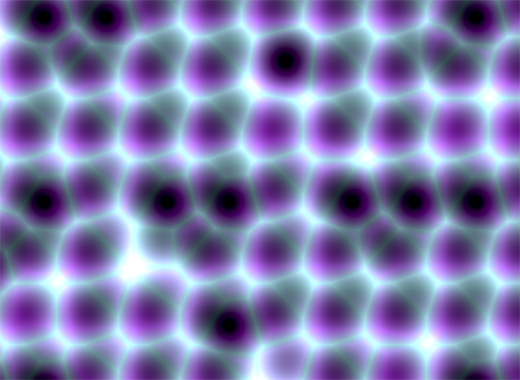
    In it’s visual appearance is almost like a Voronoi diagram, only it’s not as famous like it’s counterpart. Even Wikipedia discuss it very briefly. Worley noise in it’s essence is a noise generation pattern, which means by multiplication/addition of different octaves of the same noise pattern we can produce a variety and completely different outputs. This is the fun part of working with generative patterns.

    Now, after we gain a little theoretical introduction let’s get started with the basics, and try to dissect how can we reproduce those organic shapes and textures found in every living being in nature. (In parentheses being said, in many graphic simulations and parametric applications dealing with textural visualizations this shapes can be found). As a last side note before we go into the technical details, my intention was to implement the algorithm in Javascript mainly because i wished to be accessible by as many users as possible, and at the same time i was curious how far can i stress the limit of the modern web browsers. This is an experiment based 100% on CPU, so WebGL was out of scope, only because i was not playing with this technology until now, but i considering to implement on GPU in a shorter or longer future.

    Feature points

    The basic idea is to spread randomly varying number in space and calculate the distance to these point from every possible location of space. As a complement, Worley suggest to assign to each feature point an unique ID number. This number can be used to generate surface with colored areas or crocodile like textures, cityblock diagrams etc. depending on the algorithm, or coloring function implemented.

    The noise function simply computes a single value for every location in space. We can then use that value in literally thousands of interesting ways, such as perturbing an existing pattern spatially, mapping directly to a density or color or adding multiple scale of noise to make a fractal combination. While there are infinite number of possible functions which provide an infinite number of outputs, noise’s random behavior gives a much more interesting appearance  then simple gradients for example.

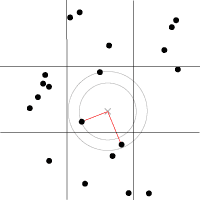
    By spreading  feature points randomly through the 3D space we build a scalar function based on the distribution of the points near the sample location. Because an image worth a thousand of words the picture below describes a space with feature points scattered across the plane.

    For a position on the plane (marked with x in the picture above) there is always a closest feature point, a second closest, a third and so on. The algorithm is searching for such feature points, return  their relative distance to the target point, their position and their unique ID number.

    Another key component of the algorithm is the demarcation line which is supposed to be integer in every plane. Each squares (cubes in 3D) are positioned so that their identification numbers can be expressed with some integer values. Let’s suppose we want to obtain the distance to the two feature point closest to the (3.6, 5.7) we start by looking at the integer squares (3, 5) and compare it’s feature points to each other.  It’s obvius that the two feature points in that square aren’t the two closest. One of them is, but the second closest belongs to the integer square (3, 6).

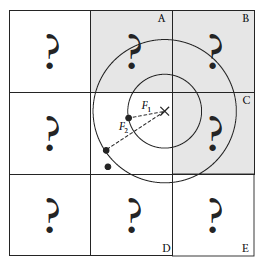
    It’s possible that some feature points are not inside the square where the target point is placed, in this case we extend our analysis to the adjacent squares. We could just test all 26 immediate neighboring cubes, but by checking the closest distance we’ve computed so far (our tentative n-th closest feature distance) we can throw out whole rows of cubes at once by deciding when no point in the neighbor cube could possibly contribute to our list. We don’t know yet what points are in the adjacent cubes marked by “?,” but if we examine a circle of radius F1, we can see that it’s possible that the cubes labeled A, B, and C might contribute a closer feature point, so we have to check them. As resulted from the image below, it’s mostly possible to check 6 facing neighbors of center cube (these are the closest and most likely to have a close feature point), 12 edge cube and 8 corner cubes in 3D. We could start testing more distant cubes, but it’s much more convenient to just use a high enough density to ensure that the central 27 are sufficient.

    The code implementation in Javascript

    For the code implementation i used html5 canvas. I’ve commented the source code, so won’t be too hard to follow for anyone. Because (as i mentioned in the beginning) my WebGL knowledge is quite minimal, for this reason i tried to optimize every single bit of code. For this reason my single option was to use web workers by separating the main core from the computationally heavy and intense pixel manipulation logic. There is a well described article on html5rocks.com about the basic principles of web workers, followed by some very neat examples regarding the implementation of them.

    The main advantage of using web workers is that we can eliminate the bottlenecks caused by computational heavy threads running in the background, separating the implementation interface from the computational logic. This way we can reduce the hangouts caused by intensive calculations which may block the UI or script to handle the user interaction.

    Creating a web worker is quite simple. We define the variables we want to pass to workers, and by calling an event listener using postMessage function we transfer the main tread instructions to the worker (which is running in a separate thread). Because web workers run in isolated threads, the code that they execute needs to be contained in a separate file. But before we do that, the first thing we have to do is create a new Worker object in our main page. The constructor takes the name of the worker script:

    In  a separate script we’ll define wich are the variables we want to listen for. This part is responsible for the heavy weight operations. After the pixel calculations has been done, we pass over the results through the postMessage method to the main thread. This part of code looks like the following:

    As a last option i’ve included the DAT.GUI lightweight graphical interface for a user interaction, where we can select different methods, colors etc. and lastly to offer the possibility for rendering with or without web workers.

    Hopefully you find interesting this experiment, and if you have some remarks, comments, then please use the comments field below, or share through twitter.

  • 404 page

    404 page

    During the setup of my site i decided to create a custom 404 page, inspired by this nice canvas experiment made by Hakim. I wanted the bubbles to be bursted by mouse click and to integrate the representative “404” text message, which i wanted to be reactive to the mouse and wave movement.

    So for that reason i’ve rewrite the code pretty much for my own purposes, plus i wanted to integrate some searching functions into my site. For this reason i was looking for a free php searching engine. I found sphider to be well acclaimed among users and developers, so i gave it a try. I managed to setup the search engine almost instantly, however the visual appearance have to be polished a little bit.

    A challenge for me was to integrate the text into the canvas considering I opted for a big bold character. I’ve tried the canvas native fillText function, but the text edges were very jaggy, so i decided to inject SVG code into the canvas, which looked like this:

    
    var data = "data:image/svg+xml," +
        "<svg xmlns='http://www.w3.org/2000/svg' width='400' height='400'>" +
        "<foreignObject width='100%' height='100%'>" +
            "<div xmlns='http://www.w3.org/1999/xhtml' style='font: bold 160px Myriad Pro, Arial, Helvetica, Arial, sans-serif'>" +
                "<span style='color:rgb(32,124,202); opacity: 0.8; -webkit-text-stroke-color: white; -webkit-text-stroke-width: 2px'>" + letters[pos] + "</span>" +
            "</div>" +
        "</foreignObject>" +
    "</svg>";
    

    As a last element I introduced a twitter feeder, which search for every word i define, and used Modernizr for a fallback for browsers which does not support canvas. Sorry IE.